 EN
EN

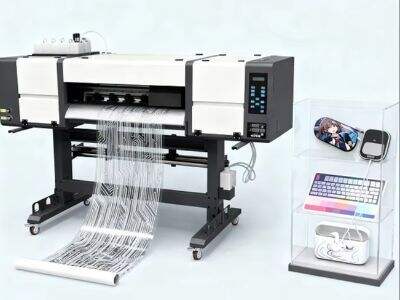
Creating DTF (Direct to Film) transfers with a inkjet printer can be an exciting and innovative experience. It takes designs you print on film and transfers them to various materials, such as shirts, bags or hats. Inspired by Whether you want edge or something efficient, the right tools and materials can help your design show off your style. In this post, we will discuss how to choose the best inkjet printer for DTF transfers and where you can buy good transfer film. Our ERA SUB brand will be there for you the entire way
How to Select The Best Inkjet Printer For High Quality DTF Transfers
Picking the right inkjet printer is critical for producing successful DTF transfers. First, we want a printer that can print high-quality images. Find one that has a high resolution; this means it can print a lot of tiny details. A 1200 DPI (dots per inch) printer will help ensure your designs look sharp and professional. You should also considering what type of ink the printer uses. Pigment inks are generally more suited for DTF transfers, as they have greater longevity and color vibrancy
The size of the printer is also something to keep in mind. If you're going to print big designs, you probably need a larger printer. Some printers can print only standard sizes, and some do it on larger size sheets. Definitely look at the specs to see what size of film it can print on. Also, consider how accessible the replacement ink and film for your printer will be. You don’t want problems when you’re going to need even more supplies
It’s a good idea for researching reviews from people who have used that printer as well for DTF transfers. They can tell you what happened to them, for better or worse. If possible, look at sample prints from the printer to assess the quality for yourself. Special features on some printers include automatic color correction or advanced settings that can streamline your printing experience
Don’t forget about the price! Printers come in all price ranges. You’re looking for something that fits your budget and will get you good quality. Occasionally spending a little more gets you a printer that works better, and that lasts longer. We get that having the right tools to do any job is essential here at ERA SUB, so take your time and find the right printer for DTF transfers

Where You Can Get High-Quality DTF Transfer Film for Your Business
Quality DTF transfer film is just as important as the printer itself. A high-quality film can go a long way in helping your projects look their best. You are going to need some film that is designed exclusively for DTF printing. This sort of film often comes with a special coating to make the ink adhere better and more smoothly transfer to fabrics
One of the best places to find DTF transfer film is online. There are many retailers who sell multiple brands, and you can read reviews to find which ones folks have the most luck with. Be sure to review the film’s caliper. Thicker films will often be able to take a bit more detail in the print, and potentially give you better transfer quality. Sample packs are available from some suppliers, which might be a good way to sample different types before buying in bulk
If you don’t want to shop online, DTF transfer film is becoming available at some brick-and-mortar craft stores locally. But the selection may be more limited than what is available online. I would call ahead to see if they have what you need. You also can partner with other businesses that do DTF printing. They could have names of vendors they’ve had a good experience with. Networking in online forums or even social media groups for DTF printing can guide you to good sources
At ERA SUB we advise you verify the film specifications to ensure it is compatible with your printer and ink. That way it will save you from any 'problems' when it comes to print time. Remember that quality matters! The right film will make all the difference in a smooth transfer or a frustrating one. So go slow, do your homework, and discover the best DTF transfer film for your projects
How to Prepare Your Art Correctly for DTF Transfers
DTF (Direct to Film) Transfers can be a fun way to print designs onto shirts and other fabrics. First, you must set up your art correctly. First, pick a computer program that allows you to create or modify images, such as Adobe Illustrator or its free alternative GIMP. When you design, be sure to use brilliant colors. Even the colors are a little more vibrant when printed. The best thing you can do is design your piece in a really high resolution, which will give you lots of detail. A fine resolution is 300 DPI (dots per inch). This will help your design look crisp and clean on the fabric
After that you go in File and save your artwork in the desired format. PNG is a good option because it will be lossless (not losing any quality) and support transparent backgrounds. Once you’ve saved your design, test the size to be sure it will fit on the T-shirt or piece of fabric on which you want to print. You can resize your picture inside the program you used to create it. Ensure that your design has the correct dimensions to fit the space where you plan to print it without being too large or too small
Once resized, it’s time to slap on a white background. Transfer Type:DTF4 DTF transfers perform best with a white under base. You could do this by drawing a new layer behind your drawing, and fill it with white. This layer will allow the colors to pop more when printed. When everything appears the way you want it to, save your file once more, and then print! At ERA SUB we ensure our DTF transfer is easy and painless so you can create beautiful designs in no time
Troubleshooting Tips for Wholesale Buyers
If you’re a fan of DTF transfers and you buy them in bulk, you might hit some snags. Don’t worry! A lot of things are easy to fix. First, make sure the quality of your transfers is good. If the colors seem muted or the patterns seem out of focus, it could be due to printing methods. Always ask for a sample before you purchase bulk. Order. This way you can see how the transfers look on fabric and know if they are up to your standards
Another problem may be the fabric you are using. DTF transfers are not recommended with all types of fabrics. For most effective use, select cotton or cotton blends. If you attempt the transfer using really slippery or shiny fabric, it will probably not adhere well. If you're seeing the transfer peel, it means that there is a heat press error. Be sure to adhere to the recommended temperature and pressure level
If you’re still struggling, don’t be afraid to ask for help. At ERA SUB, we support our wholesale dealers. We can offer advice on how to fix things. Excellent communication gets you the best transfers possible and we want you to be happy with your order

An in-depth guide to perfecting your DTF transfers: Optimizing Your Inkjet Printer Settings
Achieving the most from your inkjet printer is vital for creating DTF transfers. Begin by using your printer on the highest quality setting. This may be called “high quality” or “photo quality” in your printer settings. This causes your designs to print with sharp detail and crisp colors
After that, you’ll need to pick the right paper. Only use DTF transfer paper for inkjet printers. This papaer is formulated to hold ink the best and offer you easily read bleed free results. After you insert the paper into the printer, verify that you are using the correct side. Some transfer papers are shiny on one side and rough on the other; double-check you’re printing on the correct side
Another critical property to consider is the type of ink. Use pigment-based inks if possible. These inks are less likely to fade and last longer on fabric. A little test print before you start printing. This way, you can see how the color turns out and if any modifications are necessary. If your colors look light, you may need to boost the brightness or saturation in your design software
And lastly, keep your printer clean. Dust and old ink can lead to issues that make your prints come out less than perfect. At ERA SUB, we understand that a clean printer is the key to great transfers. By doing these things and properly preparing you inkjet printer, you’re now getting perfect DTF transfers that look best on any fabric
Table of Contents
- How to Select The Best Inkjet Printer For High Quality DTF Transfers
- Where You Can Get High-Quality DTF Transfer Film for Your Business
- How to Prepare Your Art Correctly for DTF Transfers
- Troubleshooting Tips for Wholesale Buyers
- An in-depth guide to perfecting your DTF transfers: Optimizing Your Inkjet Printer Settings