 EN
EN

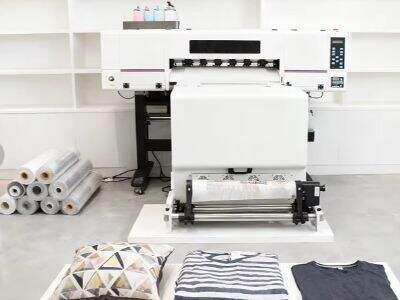
DTF (Direct to Film) Printer's head Cleaning is very important. Dirty or clogged print heads can cause problems — from bad prints and colors mixing to complete failure of your printer. We understand at ERA SUB that looking after your printer is the secret to perfect printing results! Here is a guide to how you should be cleaning your DTF print head and some of the things that you may need to know about this
How to clean DTF print heads the right way so they last and perform
When you clean the print head of your direct-to-film printer, in a way, it’s like giving your printer a cool bath. You begin by powering down the printer and disconnecting it. Safety first! Next, use a soft cloth or paper towel to clean dust or ink off the exterior of the print head. Next, you may use a print head cleaner. Soak the cloth in the solution and gently wipe the print head. Take care not to touch any other areas of the printer. If your print head is really clogged, you might need to soak the print head in the cleaning solution for a longer time. After cleaning, allow it to dry and don’t reconnect the printer yet – so that you can run a test print and determine whether the colors will come out clearly. If the print head is still not yet working properly, you may need to repeat the cleaning process or address another problem
Everything That You Need To Know About DTF Print Head Cleaning Methods
There’s a lot more to cleaning out your DTF print head than just squirting any old liquid in there; you have to use the right sh*t! A lot of people think water is sufficient but sometimes it’s not. ” Special cleaning solutions dissolve stubborn old ink that water can’t get at. It’s also best to avoid anything too harsh, as it might damage the print head. Some printers also have a built-in cleaning cycle that you can initiate. This cycle puts a small amount of ink through to clean out the nozzles. If you’re noticing your prints are skipping or have lines, it might be in order to clean your print. As with all printing projects, follow the instructions in your printer’s manual to get the best results. Maintaining a clean print head enables the printer to function even longer without any issues. A few minutes of cleaning now will save you a lot of time and headache in the future. Don’t forget to check your printer’s “blood pressure” every now and then so that you’ll be able to keep it up and running

Prolonging the Life of Your Print Heads: School Cleaning
Keeping your DTF( Direct to Film) Print-heads clean is very important for prolonging their life. How your DTF printer works: Small ink droplets shoot out from the print-heads onto the film. As time goes by, ink can pool and dry, leading to trouble. If you wish that your print heads from ERA SUB work properly for many years, it’s he most sensible to wash them regularly. The first troubleshooting method is to perform a cleaning cycle. This is generally an option in the printer settings. The cleaning action to circulate a special cleansing solution through the nozzles. The solution dissolves any dried ink and flushes away any build-up. When you do this, be sure to follow the instructions for your printer model
Then, you can manually clean. This process requires that you have a soft cloth or a cotton swab with some cleaning solution on hand. Gently clean the print heads to clear any remaining ink. Just be careful not to press too hard, print heads are delicate. You’ll want to do a test print after cleaning to see if the colors are coming out nice and vibrant. Continue Print still looks bad? Always place your printer in a clean spot and cover it when not in use. Print heads, too can be affected by dust and dirt. Performing some routine maintenance on your printer will make it run more efficiently and prolong its life. Doing so will ensure your era sub DTF printers are in ship shape, and will continue to produce beautiful prints time and time again
What Are the Advantages of Regular DTF Print Head Cleaning for Wholesale Clients
It becomes of great significance to maintain your DTF print heads clean for those who are wholesale buyers. Regular cleaning can prevent issues that might slow your business down. Print heads that are clear result in better performance and more vibrant prints. What this means is that every-time a wholesale buyer uses one of their ERA SUB printers, the prints look fantastic. Good prints can be a selling point for more customers, and keeping them happy with quality work is essential to returning business. Happy customers are bound to return for more orders
Another advantage of cleaning the print heads is that it can save you money. Clogged print heads that stop working could mean expensive repairs or replacement print heads. There is also the obvious hygiene aspect – cleanliness and regular cleaning are a help to this state of affairs. And when the print heads are clean, ink flows better, meaning that you waste less ink. This is especially important for my wholesale customers who do a lot of printing. To keep costs down, and make more profit
It can also help the printer run smoother if you clean the print heads. When done right, the printer can turn out more prints in less time. That allows wholesale buyers to fill orders faster. Speed is crucial in the wholesale business, and a clean printer can mean the difference between making or losing money. In the end, routine DTF print head maintenance appeals to large orders folks who want to be smart about their investment. It maintains high quality, saves money and increases productivity so that it’s possible to serve customers well
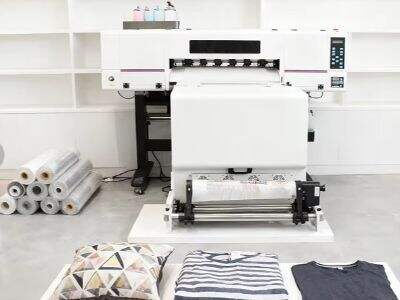
How to Solve Common DTF Printer Print Head Problems After Cleaning
Even when it is maintained well, some problems may occur in DTF print head after cleaning. You need to understand how to diagnose these problems. One of the main frequent issues are lost colors in images. If you find one color is not appearing, it’s likely the print head is still clogged. You may have to put the cleaner through another cycle in this case. Sometimes, a deep clean can solve the issue
Another problem is banding, when stripes are visible in the prints. This may occur due to misalignment of print heads. Adjust the print head alignment in your ERA SUB printer after cleaning. There is a way for most printers to realign the print heads. Follow directions to ensure everything is aligned correctly
You might also see if the prints are emerged faded. It could be because your ink levels are low. Be sure to look at the ink cartridges and replace any that are running low. Occasionally, the issue can arise when you are using outdated or old ink. Use fresh ink to get the best results
Finally, if you're still having problems after cleaning and inspecting everything it's probably time to consult your printer's manual or customer support. They may be able to give you specific advice for your printer. Printing head problems may require troubleshooting that you will have to spend a lot of time resolving, but it is all worth it if tht will keep your print working as good as new. Just be patient and follow along, you’ll soon be back to making some great prints
Table of Contents
- How to clean DTF print heads the right way so they last and perform
- Everything That You Need To Know About DTF Print Head Cleaning Methods
- Prolonging the Life of Your Print Heads: School Cleaning
- What Are the Advantages of Regular DTF Print Head Cleaning for Wholesale Clients
- How to Solve Common DTF Printer Print Head Problems After Cleaning