 EN
EN

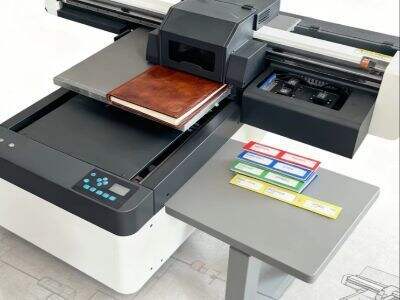
A lot of people enjoy making unique designs on clothing and other items. One method is a special type of printing style called DTF, which stands for “Direct to Film. ” This technique enables you to print vivid images with that stick well on fabric. If you own an ordinary printer at home and are determined to modify it to print in DTF, then go ahead! At ERA SUB we believe that when you print, it should be the best. So, let’s discuss how to convert printer to DTF
How to Change Printer into DTF and Printing High Quality Prints
To get started, there are some essential things you need to confirm before converting your printer into a DTF machine. The first thing that you will need to get started with this process is an inkjet printer because it works best for this method. Next, you will need DTF ink. This is not ordinary printer ink, and it makes the designs stick to fabric better. Once you have the ink, you’ll also need DTF transfer film. This is the film where your design will be printed so that it can then be transferred to the fabric
As soon as you have everything, begin by swapping out the ink in your printer. Be sure to pull out the old cartridges and install the DTF cartridges. Be cautious! If you dilute regular ink with DTF ink, you could ruin the prints. After that is the setting up your printer to be able to print on DTF film for sale. Load the film in your printer, same as paper
Now comes the moment of truth — time to print your design! Use software that lets you design your own images Be sure to print the image on the flip. This step is very important! It may look backward on the film when it prints but it will print correctly in reverse on fabric. After printing, apply hot-melt powder on the wet ink that still exists This powder provides a grit that the ink can bind to when you transfer it
After you have printed and dried everything, you will use a heat press to adhere your design to the fabric. Adjust the heat press according to its temperature and pressure. For a few seconds, press the cloth you placed the film on. Then, peel away the film and you should have your design printed precisely onto the fabric! Getting the hang of this can be tricky, but with practice, you'll get better
Things You Must Know to Convert a Printer into DTF
DTF Printer Conversion is a cool project, but it comes with its obstacles. One of the universal problems people have, is with colors. Other times, the colors you see on screen don’t match the colors that are printed on film. This is due to different settings on your printer. To correct this problem, you may need to change the color settings in your printing software
Another issue might be that the ink does not adhere closely enough to the film. If this is the case, your hot-melt powder wasn’t applied sufficiently after printing. Make sure you sprinkle plenty onto the wet ink so that it bonds with the fabric when we move on
There’s also people who forget to mirror their images before printing them. If you do, your design will be reversed This error can be very frustrating to make so always remember to check before hitting print
Finally, a few people say the heat press doesn’t become hot enough. If it is too cool the design will not press to the fabric. Yes, you should be aware of the appropriate temperature if not, for the fabric in question
We understand that the details always matter when it comes to printing at ERA SUB. If you run into trouble, don’t worry! With time and a bit of patience, you will be able to work around these problems. Just keep experimenting and sooner or later you will find that perfect recipe for the DTF prints everyone will love
Common problems in the process of DTF printer conversion and how to troubleshoot
When you’re going from a printer to DTF (Direct to Film) then it’s common that you will encounter some issues Don’t worry: plenty of people go through it. The first thing that most users run into are clogged print heads. This may occur when the ink runs low or if you haven't used your printer for a while. To correct it, you can put the printer through a cleaning cycle. There is typically also an option for this in printers. If not, you may need to use a cleaning solution to safely clean the print heads. OR, it maybe the ink not adhering to the film. To fix this, ensure you’re using the correct type of DTF film and that it’s compatible with your printer. It is also crucial to consider the temperature settings on your printer and heat press - both a little too high or a little too low may result in an inferior print. If you’ve identified a hue the same hue looks different or washed out — that may well be ink. Ensure you are using high quality DTG inks from a reliable source. If you’re still having issues, don’t be afraid to check support teams or forums for other DTF printer owners who are trading stories. Remember, it can take a while to troubleshoot, have patience and you will have your printer setup for DTF Printing in no time
Where Is the Best Place to Get Cheap DTF Conversion Kits for Your Printer
If you want to get started printing DTF designs, you need to find affordable DTF conversion kits. There are many websites and storefronts selling these kits. While on the hunt for a kit, ensure you seek one that fits your exact printer model. You can begin by browsing online marketplaces dedicated to printing supplies. Seek out kits that include everything you will need, such as the relevant inks, films and transfer powder. Local printing supply stores are also a good place to find inexpensive kits. Occasionally, these stores have deals or discounts that can save you some cash. And be sure to keep your eye on the site of companies like ERA SUB, which sometimes run special deals or packages for DTF printing. Also, there are online groups you can join (forums) on where people discuss DTF printing. Members frequently share where they purchased their kits and any good deals they found Shopping around is important. Look for some good customer reviews and do your research on the cost of a kit to make sure that you are not overpaying. Remember, when it comes to DTF printing, investing in a reliable conversion kit is just the beginning
How to improve the profitability of DTF Printing in Wholesale Business
To really turn a profit with DTF printing — particularly if you’re running a wholesale business – you need to know how to make as much money doing it as possible. First, you will need to consider what type of products you want to print. T-shirts, hoodies and tote bags are favorites. Remember to research your target audience and understand what styles they prefer. Designing something elaborate and appealing can make you to differ from other companies. But after you have your designs, concentrate on getting top-notch prints. Quality (and we’re talking about Good Quality) will result in happy customers who return for more. Next, consider your pricing strategy Check out what other people are pricing items like yours and make sure your prices are competitive. Volume discount can also help generate more customers. Partnering with local businesses or schools would also be another way to increase profits. They may require custom printed products for events or promotions. You can generate consistent orders by forming partnerships with them. Also, you could use social media to display your wares and be able to get a wider audience. Post photos of your prints and communicate with your audience to establish a fan base Lastly, the financial part - take notes of your costs and earnings. This will help you identify the sales of your best items, and where you can reduce costs. With a bit of planning and care for quality, you can make DTF printing work as an excellent value-adding service to your wholesale
Table of Contents
- How to Change Printer into DTF and Printing High Quality Prints
- Things You Must Know to Convert a Printer into DTF
- Common problems in the process of DTF printer conversion and how to troubleshoot
- Where Is the Best Place to Get Cheap DTF Conversion Kits for Your Printer
- How to improve the profitability of DTF Printing in Wholesale Business